

Go to Windows platform Display platforms icon
Go to Windows platform Go to Mac platform Go to Android platform Go to iOS platform
FanCtrl icon

FanCtrl

1.8.0
5 1 reviews
20.9 k downloads
security security

Control your PC's fans

Advertisement
Remove ads and more with Turbo
Advertisement
Remove ads and more with Turbo
Alberto García icon
Reviewed by
Alberto García
Developer’s Operations and Support
Alberto García is part of Uptodown's in-house Editorial Team. Translated by Uptodown Localization Team

FanCtrl is a comprehensive program that you can use to control all your computer's fans and configure their performance according to the temperature of your components.

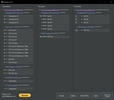
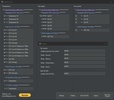
When you open FanCtrl, you will see the temperatures for the components of your motherboard, your processor cores, the graphics card and the storage units. You can change the name of each temperature reading for further customization at any time.

Advertisement
Remove ads and more with Turbo

Next to that, you will find the revolutions at which the fans connected and working with a PWM connector are spinning. To distinguish between a connector with PWM and one without PWM, you have to look at the number of pins on the cable connector and on the motherboard. If both have four, you can make use of that additional fourth pin to control the revolutions at which the fan spins.

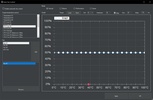
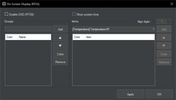
One of FanCtrl's most interesting features is its Auto Fan Control mode. With it, you can adjust the speed at which each fan should spin depending on the temperature of a component. For example, if the CPU temperature rises above a certain figure, you can make the fans inside the PC case spin faster. You can even create presets for quicker access.

FanCtrl is compatible with various PC component monitoring programs. Among them are NZXT Kraken, EVGA CLC, HWiNFO, LibreHardwareMonitor, and many more.

If you want to adjust the speed of your PC's fans and apply these changes automatically, downloading FanCtrl is an excellent option.

Information about FanCtrl 1.8.0

Basic information

Developer lich426
Category Monitoring
Rating All ages
Languages English
47 more

Distribution model

Pricing Free
License GPL 3.0
Source code
Copyright © 2026 lich426
Why is this app published on Uptodown? (More information)

Security and privacy

Required permissions Not applicable
See security and antivirus report

Download info

Downloads 20,851
Date Aug 31, 2026
File type ZIP
Size 23.73 MB
SHA256 5ef94a7c94b9ecdc524a3230e0360b2c1c327b3ddf462981f17aa1e240a7944c
Advertisement
Remove ads and more with Turbo

Older versions

See more
zip 1.7.9 Jul 24, 2026
zip 1.7.8 Nov 27, 2025
zip 1.7.7 Oct 2, 2025
zip 1.7.6 Sep 19, 2025
zip 1.7.4 May 19, 2025
zip 1.7.3 Mar 12, 2025

Rate this App

Review the app
FanCtrl icon

Rating

5.0
5
4
3
2
1
1 reviews

Comments

There are no opinions about FanCtrl yet. Be the first! Comment

Advertisement
Remove ads and more with Turbo
Fan Control icon
Control the speed of your PC's fans
MSI Afterburner icon
Make the most of your graphics card
SignalRGB icon
Control and synchronize your PC lighting
Chris Titus Tech's Windows Utility icon
Optimize, uninstall and customize with ease
OCCT: OverClock Checking Tool icon
Easily detect any overclock and/or hardware problems
Universal Watermark Disabler icon
Disable Windows watermarks
Microsoft PowerToys icon
Improve productivity on Windows
Rectify11 icon
A more consistent experience on Windows 11
AI Suite 3 icon
Monitor your computer and update your ASUS software
MSI Afterburner icon
Make the most of your graphics card
SignalRGB icon
Control and synchronize your PC lighting
OCCT: OverClock Checking Tool icon
Easily detect any overclock and/or hardware problems
MSI Dragon Center icon
Take control of your PC's performance
HP OMEN Gaming Hub icon
The official HP app for improving your PC's performance
iCUE icon
Manage all the Corsair devices on your computer
Fan Control icon
Control the speed of your PC's fans
Codex icon
OpenAI's official companion for programming with ChatGPT
Proton VPN icon
Powerful, free, secure and unlimited VPN
Telegram Desktop icon
Talk to all your Telegram contacts from the desktop
PCSX2 icon
The ultimate PlayStation 2 emulator for PC
Rufus icon
Create boot disks from an external drive
RunCat 365 icon
Visualize your PC's performance with a moving cat
Quiver Launcher icon
Download and run ports, decomps, and recomps from GitHub
Hermes Agent icon
A smart assistant in your terminal
WPS Office icon
An editing tool with powerful features
AnyDesk icon
Faster remote desktop is possible
Logitech G HUB icon
Full control over your Logitech G peripherals
Windows 10 icon
Download the latest Windows 10 ISO on your device
SSuite Office WordGraph icon
A Brilliantly Efficient Word Processor for Modern Creators.
Microsoft Word icon
The leading word processor for working with documents
FAT32Format icon
A lightweight program for format in FAT32
CCleaner Free icon
Remove all the junk that Windows accumulates